
 shaobo
c8cec13f7f
fix bugs - release cuda caches at the end of response
shaobo
c8cec13f7f
fix bugs - release cuda caches at the end of response
|
1 rok temu | |
|---|---|---|
| .. | ||
| models | 1 rok temu | |
| protocols | 1 rok temu | |
| resources | 1 rok temu | |
| services | 1 rok temu | |
| README.md | 1 rok temu | |
| README_zh.md | 1 rok temu | |
| main.py | 1 rok temu | |
| requirements.txt | 1 rok temu | |
README.md

Local Mode
The new version of the CodeGeeX plugin supports offline mode, allowing the use of offline deployed models to complete automatic completion and simple conversation functions.
Usage Tutorial
1. Install Dependencies
cd local_mode
pip install -r requirements.txt
2. Run the Project
python main.py --model_name_or_path THUDM/codegeex4-all-9b --device cuda --bf16 true
>>> Running on local URL:  http://127.0.0.1:8080
3. Set API Address and Model Name
As shown in the figure below, after opening the plugin with the local mode, enter the API address and model name in the settings.
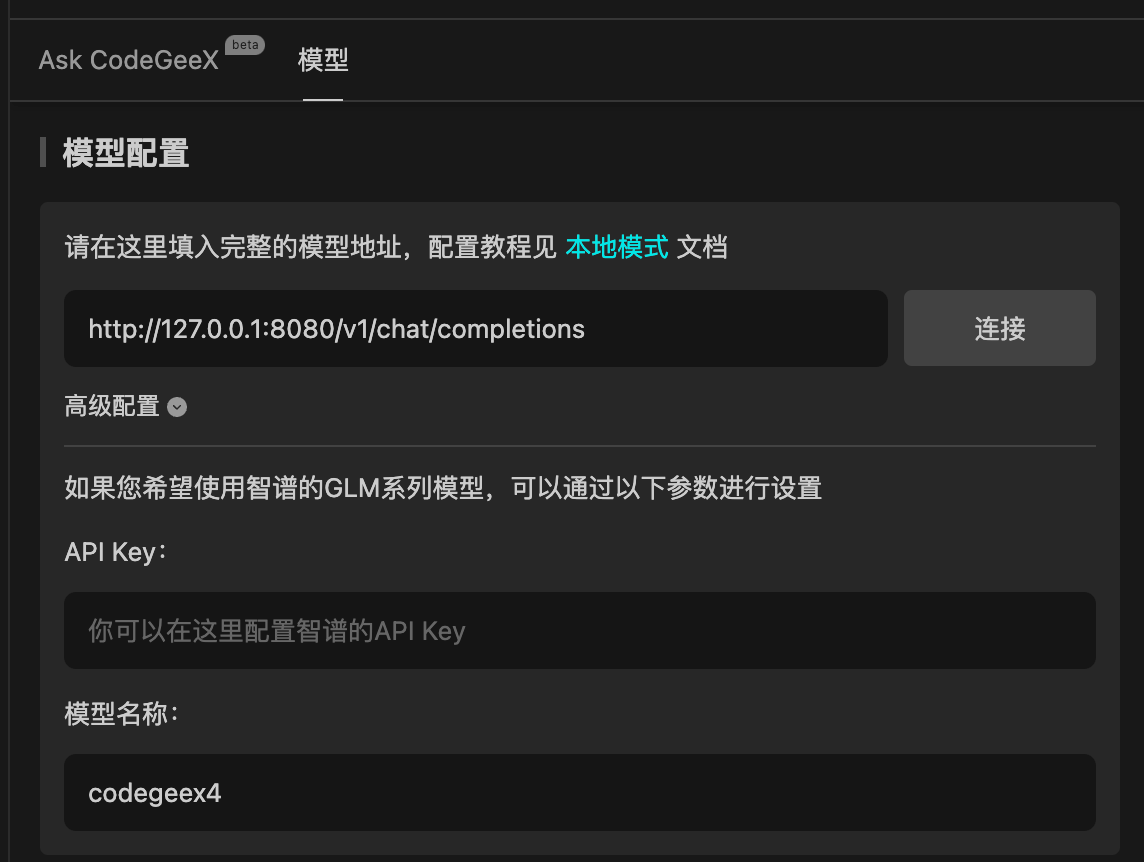
4. Start Using
Click 'Connect' to test, or click 'Ask CodeGeeX' to start using.
Demo
