English | 中文
# Claude Code Hub
**🚀 Intelligent AI API relay platform — the control center for multi-provider onboarding, elastic routing, and granular operations**
[](https://github.com/ding113/claude-code-hub/pkgs/container/claude-code-hub)
[](LICENSE)
[](https://github.com/ding113/claude-code-hub/stargazers)
[](https://t.me/ygxz_group)
[](https://deepwiki.com/ding113/claude-code-hub)
Claude Code Hub combines Next.js 15, Hono, PostgreSQL, and Redis to deliver a Claude/OpenAI-compatible API gateway with smart load balancing, live observability, price governance, and automated documentation, enabling teams to manage multiple AI vendors safely and transparently.
💬 **Join the discussion**: Questions about deployment, features or technical issues? Join our [Telegram community](https://t.me/ygxz_group)!
---

|
💎 Special Offer: Cubence is a stable and efficient AI service transit platform, providing transit services for AI tools such as Claude Code, Codex, Gemini, with good stability and cost-effectiveness.
Cubence offers special discount coupons for users of CCH: when purchasing with the coupon DING113CCH, you can enjoy a 10% discount → Visit Now
|

|
💎 Special Offer: Thanks to PackyCode for sponsoring this project! PackyCode is a stable and efficient API relay service provider, offering relay services for Claude Code, Codex, Gemini and more.
PackyCode offers a special discount for users of this software. Register via this link and enter code WITHCCH when recharging to enjoy 10% off → Visit Now
|

|
💎 Special Offer: YesCode is a low-profile yet highly reliable AI API relay service, dedicated to providing developers with stable access to Claude, Codex, Gemini, and other models. Built on solid technical foundations with consistently dependable service quality.
Register via this link to get started → Visit Now
|
## ✨ Core Highlights
- 🤖 **Intelligent load balancing**: Weight + priority + grouping scheduler with built-in circuit breaker and up to three failover retries to keep requests stable.
- 🧩 **Multi-provider management**: Connect Claude, Codex, Gemini CLI, and OpenAI-compatible vendors simultaneously with per-provider model redirection and HTTP/HTTPS/SOCKS proxy rules.
- 🛡️ **Rate limiting & concurrency control**: Enforce RPM, monetary quotas (5-hour / weekly / monthly), and session concurrency via Redis Lua scripts with atomic counters and fail-open degradation.
- 📘 **Automated OpenAPI docs**: 39 REST endpoints exported from Server Actions into OpenAPI 3.1.0, instantly browsable in Swagger and Scalar UI.
- 📊 **Real-time monitoring & analytics**: Dashboards, active sessions, consumption leaderboards, decision-chain tracing, and proxy health tracking provide second-level visibility.
- 💰 **Price sheet management**: Paginated SQL queries with debounce search and LiteLLM sync keep thousands of model prices searchable in milliseconds.
- 🔁 **Session management**: Five-minute context cache preserves decision trails, reduces vendor switches, and maintains full auditability.
- 🔄 **OpenAI-compatible endpoint**: Supports `/v1/chat/completions` (OpenAI-compatible format), passes through tool calls and reasoning fields, enforces strict same-format routing with no cross-format conversion.
## ⚡️ Quick Start
### Requirements
- Docker and Docker Compose (latest version recommended)
- Optional (for local development): Node.js ≥ 20, Bun ≥ 1.3
### 🚀 One-Click Deployment Script (✨ Recommended - Fully Automated)
The one-click deployment script **automatically handles** all of the following:
- Check and install Docker and Docker Compose (Linux/macOS support auto-install)
- Create deployment directory and configuration files
- Generate secure admin token and database password
- Start all services and wait for health checks
- Display access URLs and admin token
**Linux / macOS:**
```bash
# Download and run the deployment script
curl -fsSL https://raw.githubusercontent.com/ding113/claude-code-hub/main/scripts/deploy.sh -o deploy.sh
chmod +x deploy.sh
./deploy.sh
```
Or using wget:
```bash
wget https://raw.githubusercontent.com/ding113/claude-code-hub/main/scripts/deploy.sh
chmod +x deploy.sh
./deploy.sh
```
**Windows (PowerShell as Administrator):**
```powershell
# Download and run the deployment script
Invoke-WebRequest -Uri "https://raw.githubusercontent.com/ding113/claude-code-hub/main/scripts/deploy.ps1" -OutFile "deploy.ps1"
Set-ExecutionPolicy -ExecutionPolicy Bypass -Scope Process -Force
.\deploy.ps1
```
**Deployment Directories:**
- Linux: `/www/compose/claude-code-hub`
- macOS: `~/Applications/claude-code-hub`
- Windows: `C:\ProgramData\claude-code-hub`
**Branch Selection:**
The script will prompt you to select a deployment branch:
- `main` (default): Stable release, recommended for production
- `dev`: Development version with latest features, for testing
**Important Notes:**
- ⚠️ Please save the **Admin Token** displayed by the script - it's the only credential to access the admin dashboard!
- ⚠️ Windows users: If Docker Desktop is not installed, the script will automatically open the download page
### Three-Step Launch (Docker Compose)
1. **Clone and configure**
```bash
git clone https://github.com/ding113/claude-code-hub.git
cd claude-code-hub
cp .env.example .env
```
2. **Edit configuration**
Edit the `.env` file and **update** `ADMIN_TOKEN` (admin login token):
```bash
# MUST change this!
ADMIN_TOKEN=your-secure-token-here
# Docker Compose defaults (usually no changes needed)
DSN=postgres://postgres:postgres@postgres:5432/claude_code_hub
REDIS_URL=redis://redis:6379
```
3. **Start services**
```bash
docker compose up -d
```
Check status:
```bash
docker compose ps
docker compose logs -f app
```
### Access the application
Once started:
- **Admin Dashboard**: `http://localhost:23000` (login with `ADMIN_TOKEN` from `.env`)
- **API Docs (Scalar UI)**: `http://localhost:23000/api/actions/scalar`
- **API Docs (Swagger UI)**: `http://localhost:23000/api/actions/docs`
> 💡 **Tip**: To change the port, edit the `ports` section in `docker-compose.yml`.
## 🖼️ Screenshots
| Feature | Screenshot | Description |
| ------------------- | ---------------------------------------------------- | --------------------------------------------------------------------------------------------------------------------- |
| Dashboard |  | Aggregates request volume, spending, active sessions, and time-series distribution for instant situational awareness. |
| Provider management |  | Configure weight, cost multiplier, concurrency caps, proxies, and model redirection per vendor for precise routing. |
| Logs & audit |  | Unified request log with filters for time/user/provider/model plus token, cost, and cache-hit details. |
| Leaderboard |  | Ranks users by requests, tokens, and spending to support chargeback and usage governance. |
## 🏗️ Architecture
### High-level view
```
Clients / CLI / Integrations
│
▼
Next.js 15 App Router (v1 API routes)
│
Hono + Proxy Pipeline (Auth → Session Allocation → Rate Limiting → Provider Selection → Forwarding → Response Handling)
│
Multi-provider pool (Claude / OpenAI / Gemini / others) + PostgreSQL + Redis
```
- **App layer**: `src/app` hosts dashboards, settings, and API actions for UI and internal APIs.
- **Proxy core**: `src/app/v1/_lib/proxy-handler.ts` chains `ProxyAuthenticator`, `ProxySessionGuard`, `ProxyRateLimitGuard`, `ProxyProviderResolver`, `ProxyForwarder`, and `ProxyResponseHandler`.
- **Business logic**: `src/lib` contains rate limiting, session manager, circuit breaker, proxy utilities, and price-sync; `src/repository` encapsulates Drizzle ORM queries.
- **Documentation system**: `src/app/api/actions/[...route]/route.ts` converts Server Actions into OpenAPI endpoints automatically.
### Data flow & components
1. **Ingress**: Requests with API keys hit the Next.js route and pass through `ProxyAuthenticator`.
2. **Context control**: `SessionManager` fetches the five-minute cache from Redis, enforces concurrency, and records the decision chain.
3. **Rate limiting**: `RateLimitService` applies Lua-driven atomic counters for RPM, spend, and session caps, falling back gracefully if Redis is unavailable.
4. **Routing**: `ProxyProviderResolver` scores vendors with weights, priorities, breaker states, and session reuse, retrying up to three times.
5. **Forwarding & response handling**: `ProxyForwarder` sends requests upstream; `ProxyResponseHandler` processes response streams while preserving endpoint-native formats, with proxy support and model redirects.
6. **Observability**: Dashboards, leaderboards, and price sheets query PostgreSQL via repositories with hourly aggregations.
## 🚢 Deployment
### 🐳 Docker Compose (✨ Recommended, Production-Ready)
Docker Compose is the **preferred deployment method** — it automatically provisions the database, Redis, and application services without manual dependency installation, ideal for production quick-start.
1. Prepare `.env` (see `.env.example`) and point `DSN`/`REDIS_URL` to the Compose services.
2. Start the stack:
```bash
docker compose up -d
```
3. Monitor:
```bash
docker compose logs -f app
docker compose ps
```
4. Upgrade:
```bash
docker compose pull && docker compose up -d
```
Stop and clean up with `docker compose down` when necessary.
### Local development (dev toolchain)
1. Enter the `dev/` folder: `cd dev`.
2. Run `make dev` to launch PostgreSQL + Redis + `bun dev` in one command.
3. Helpful targets:
- `make db`: start only database and Redis.
- `make logs` / `make logs-app`: tail all services or app logs.
- `make clean` / `make reset`: clean or fully reset the environment.
4. Use `make migrate` and `make db-shell` for schema operations.
### Manual deployment (bun build + start)
1. Install dependencies and build:
```bash
bun install
bun run build # Copies the VERSION file automatically
```
2. Export environment variables via your process manager (systemd, PM2, etc.) and ensure PostgreSQL/Redis endpoints are reachable.
3. Launch production server:
```bash
bun run start
```
4. You may keep `AUTO_MIGRATE=true` for the first run, then disable it and manage migrations explicitly with Drizzle CLI.
## ⚙️ Configuration
| Variable | Default | Description |
| ------------------------------------------ | ------------------------ | ---------------------------------------------------------------------------------------------------- |
| `ADMIN_TOKEN` | `change-me` | Admin console token — must be updated before deployment. |
| `DSN` | - | PostgreSQL connection string, e.g., `postgres://user:pass@host:5432/db`. |
| `AUTO_MIGRATE` | `true` | Executes Drizzle migrations on startup; consider disabling in production for manual control. |
| `REDIS_URL` | `redis://localhost:6379` | Redis endpoint, supports `rediss://` for TLS providers. |
| `REDIS_TLS_REJECT_UNAUTHORIZED` | `true` | Validate Redis TLS certificates; set `false` to skip (for self-signed/shared certs). |
| `ENABLE_RATE_LIMIT` | `true` | Toggles multi-dimensional rate limiting; Fail-Open handles Redis outages gracefully. |
| `ENABLE_API_KEY_VACUUM_FILTER` | `true` | Enables API Key Vacuum Filter (negative short-circuit only; set to `false/0` to disable). |
| `ENABLE_API_KEY_REDIS_CACHE` | `true` | Enables API Key auth Redis cache (requires Redis; auto-fallback to DB on errors). |
| `API_KEY_AUTH_CACHE_TTL_SECONDS` | `60` | API Key auth cache TTL in seconds (default 60, max 3600). |
| `SESSION_TTL` | `300` | Session cache window (seconds) that drives vendor reuse. |
| `ENABLE_SECURE_COOKIES` | `true` | Browsers require HTTPS for Secure cookies; set to `false` when serving plain HTTP outside localhost. |
| `ENABLE_CIRCUIT_BREAKER_ON_NETWORK_ERRORS` | `false` | When `true`, network errors also trip the circuit breaker for quicker isolation. |
| `APP_PORT` | `23000` | Production port (override via container or process manager). |
| `APP_URL` | empty | Populate to expose correct `servers` entries in OpenAPI docs. |
| `API_TEST_TIMEOUT_MS` | `15000` | Timeout (ms) for provider API connectivity tests. Accepts 5000-120000 for regional tuning. |
> Boolean values support `true/false` or `1/0`. Quoting in `.env` is also fine (dotenv will strip quotes). See `.env.example` for the full list.
## ❓ FAQ
1. **Database connection failures**
- Verify the `DSN` format and credentials; use service names (e.g., `postgres:5432`) within Docker.
- Inspect `docker compose ps` or local PostgreSQL status, and use `make db-shell` for deeper checks.
2. **What if Redis goes offline?**
- The platform uses a fail-open policy: rate limiting and session metrics degrade gracefully while requests continue flowing. Monitor logs for Redis errors and restore the service asap.
3. **Circuit breaker keeps opening**
- Inspect `[CircuitBreaker]` logs to see whether repeated 4xx/5xx or network errors triggered it.
- Check provider health in the admin console and wait 30 minutes or restart the app to reset state.
4. **“No provider available” errors**
- Ensure providers are enabled, have reasonable weights/priorities, and haven’t hit concurrency or spend caps.
- Review the decision-chain log to confirm whether breakers or proxy failures removed them.
5. **Proxy configuration issues**
- Make sure URLs include a protocol (`http://`, `socks5://`, etc.) and validate via the “Test Connection” button in the UI.
- If `proxy_fallback_to_direct` is enabled, confirm via logs that the system retried without the proxy when failures occur.
## 🤝 Contributing
We welcome issues and PRs! Please read [CONTRIBUTING.md](CONTRIBUTING.md) for the bilingual guidelines, branch strategy, and Conventional Commits requirements before submitting changes.
## 🌐 Acknowledgments
This project builds on [zsio/claude-code-hub](https://github.com/zsio/claude-code-hub), references [router-for-me/CLIProxyAPI](https://github.com/router-for-me/CLIProxyAPI) for the OpenAI-compatible layer, and [prehisle/relay-pulse](https://github.com/prehisle/relay-pulse) for provider detection functionality. Huge thanks to the original authors and community contributors!
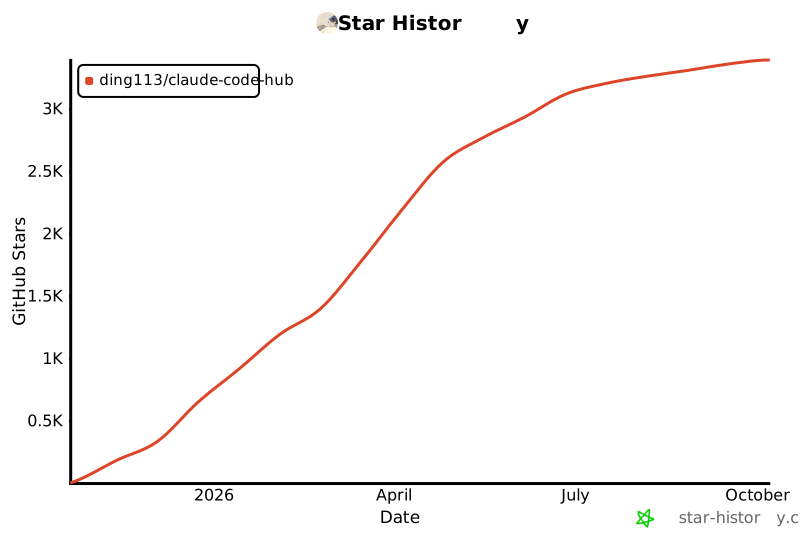
## ⭐ Star History
[](https://star-history.com/#ding113/claude-code-hub&Date)
## 📜 License
Released under the [MIT License](LICENSE). You’re welcome to use and extend the project as long as you comply with the license and retain the attribution.