---
title: "Editing Messages"
sidebarTitle: "Editing Messages"
---
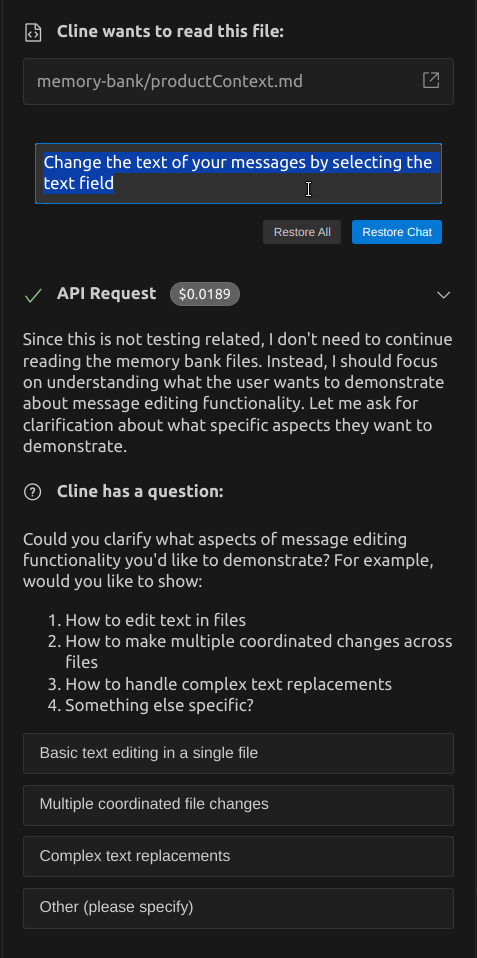
Cline allows you to edit chat messages in a task after they've been submitted. This feature lets you refine your requests without starting a new task, helping you get better results with minimal disruption to your workflow.
## When to Edit Messages
You might want to edit a message when:
- You didn't get the results you wanted
- You thought of a better way to phrase your request
- You need to add more information or context
- You made a typo or error in your original message
## How to Edit Messages
1. Click on any message in the conversation (except the initial task message)
2. Edit the text as needed
3. Use the restore options to resubmit your request
 ## Restore Options
When you edit a message, you have two options for restoring:
### Restore Chat
The "Restore Chat" option:
- Restores just the task state
- Re-submits an API request with your edited message
- Preserves all file changes made up to that point
- Is useful when you want to keep the current state of your workspace
### Restore All
The "Restore All" option:
- Restores both the task state and workspace state
- Re-submits an API request with your edited message
- Reverts your workspace to how it was at that point in the conversation
- Uses [checkpoints](/features/checkpoints) under the hood to restore your workspace
- Is useful when you want to try a completely different approach
## Keyboard Shortcuts
When editing a message, you can use these keyboard shortcuts:
- **Escape**: Exit edit mode without making changes
- **Enter**: Restore just the task (equivalent to "Restore Chat")
- **Cmd/Ctrl + Enter**: Restore the task and workspace (equivalent to "Restore All")
- **Shift + Enter**: Insert a new line / line break in your message
## Best Practices
- Use message editing for minor adjustments to your requests
- For major changes in direction, consider starting a new task
- When using "Restore All," be aware that any file changes made after that message will be reverted
- Edit messages closer to the beginning of a conversation to avoid losing significant progress
## Restore Options
When you edit a message, you have two options for restoring:
### Restore Chat
The "Restore Chat" option:
- Restores just the task state
- Re-submits an API request with your edited message
- Preserves all file changes made up to that point
- Is useful when you want to keep the current state of your workspace
### Restore All
The "Restore All" option:
- Restores both the task state and workspace state
- Re-submits an API request with your edited message
- Reverts your workspace to how it was at that point in the conversation
- Uses [checkpoints](/features/checkpoints) under the hood to restore your workspace
- Is useful when you want to try a completely different approach
## Keyboard Shortcuts
When editing a message, you can use these keyboard shortcuts:
- **Escape**: Exit edit mode without making changes
- **Enter**: Restore just the task (equivalent to "Restore Chat")
- **Cmd/Ctrl + Enter**: Restore the task and workspace (equivalent to "Restore All")
- **Shift + Enter**: Insert a new line / line break in your message
## Best Practices
- Use message editing for minor adjustments to your requests
- For major changes in direction, consider starting a new task
- When using "Restore All," be aware that any file changes made after that message will be reverted
- Edit messages closer to the beginning of a conversation to avoid losing significant progress