---
title: "Focus Chain"
sidebarTitle: "Focus Chain"
---
Focus Chain is a task management enhancement feature in Cline that provides automatic todo list management with real-time progress tracking throughout your tasks.
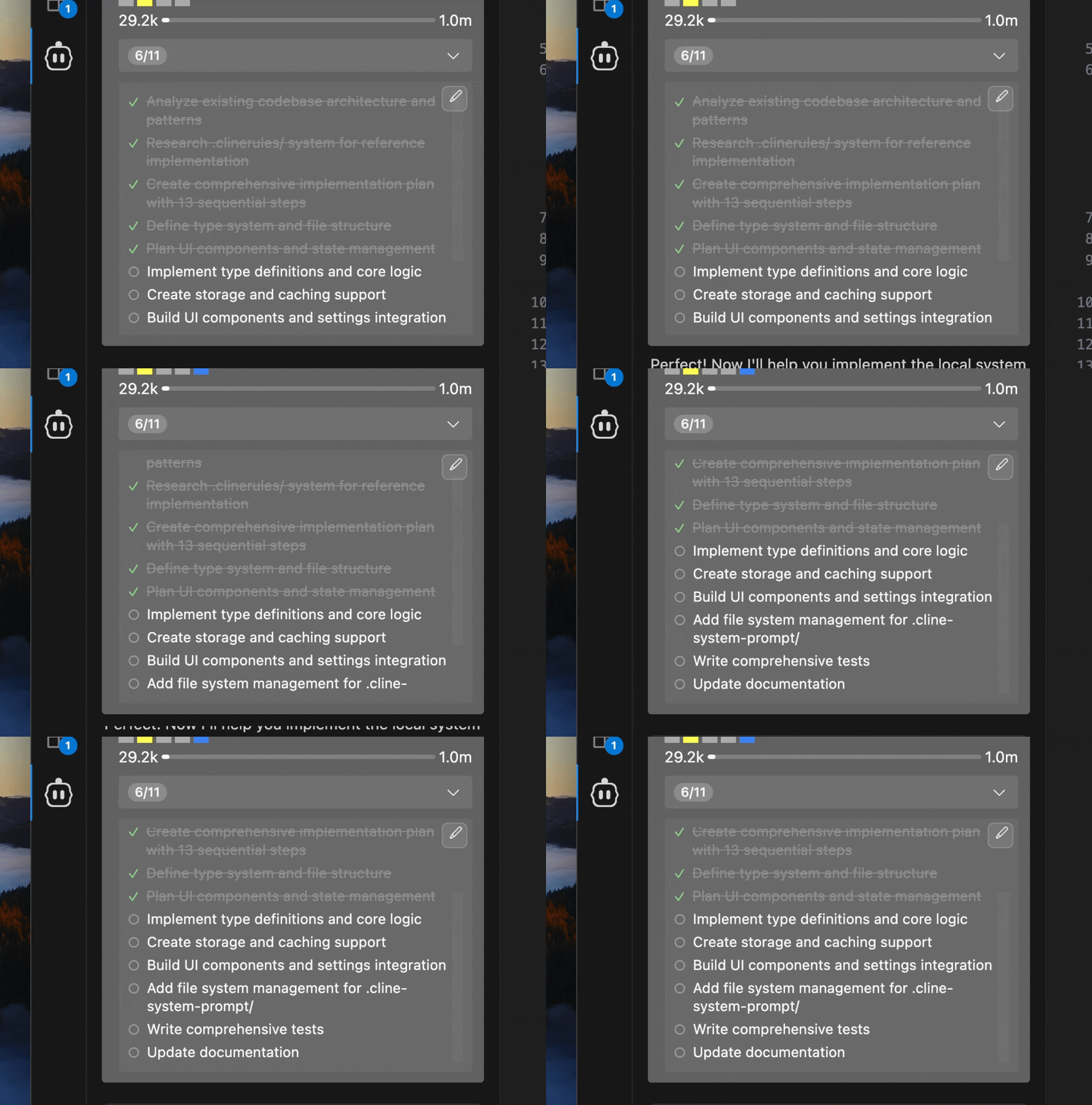 This enables Cline to work on long-horizon tasks, seamlessly managing the context sent to LLMs, and keeping Cline on track across many context window resets.
Focus Chain works particularly well with Cline's [Deep Planning slash command](/features/slash-commands/deep-planning), providing seamless progress tracking for implementation tasks created through the [planning process](/features/plan-and-act).
## Key Features
### Automatic Todo List Generation
Cline analyzes your task and automatically creates a comprehensive todo list with:
- Clear, actionable items in markdown checklist format
- Logical breakdown of complex tasks into manageable steps
- Real-time updates as work progresses
### User-Editable Todo Lists
Todo lists are stored as editable markdown files:
- Direct editing through your preferred markdown editor
- Automatic detection of changes you make
- Seamless integration back into Cline's workflow
- Quick access through the edit button in the task header
### Visual Progress Tracking
The task header displays clear progress indicators:
- **Step counters** showing current progress (e.g., "3/8")
- **Completed items** clearly marked with checkmarks
- **Current work** highlighted with indicators
- **Expandable view** to see the full todo list
### Smart Reminder System
Configurable reminders ensure todo lists stay current:
- Default reminder every 6 messages (customizable 1-100)
- Automatic prompts when switching from Plan Mode to Act Mode
- User-triggered updates when todo lists are manually edited
## Getting Started
- Click the gear icon in the Cline sidebar
- Navigate to the "Features" section
- Check "Enable Focus Chain"
- Optionally adjust "Remind Cline Interval" (default: 6 messages)
- Begin a new task
- Cline will automatically start creating and managing todo lists
| Setting | Default | Range | Description |
|---------|---------|-------|-------------|
| Enable Focus Chain | Disabled | On/Off | Enables enhanced task progress tracking |
| Remind Cline Interval | 6 | 1-100 messages | How often Cline updates the todo list |
## Usage Examples
#### 1. Task Initiation
When you start a new task with Focus Chain enabled:
``` markdown User Request
User: "Create a user authentication system for my React app"
Cline: [Analyzes request and creates todo list]
```
#### 2. Todo List Created
Cline creates a comprehensive plan for the task, stored in a markdown file:
```markdown Todo List Created
- [ ] Set up project structure
- [ ] Install authentication dependencies
- [ ] Create user registration component
- [ ] Implement login functionality
- [ ] Add password validation
- [ ] Set up user database schema
- [ ] Write authentication tests
- [ ] Deploy to staging environment
```
#### 3. Progress Tracking
As Cline works, the task header shows real-time progress:
```markdown Todo List Header
[3/8] Implement login functionality ⌄
```
Click to expand and see the full list:
```markdown Full Todo List
✓ Set up project structure
✓ Install authentication dependencies
✓ Create user registration component
○ Implement login functionality ← Currently working
○ Add password validation
○ Set up user database schema
○ Write authentication tests
○ Deploy to staging environment
```
#### 4. User Editing
Need to tweak the todo list? No problem.
Click the edit button in the expanded todo view
A markdown file opens in your editor:
```markdown Editing Todo List
# Focus Chain Todo List for Task abc123
- [x] Set up project structure
- [x] Install authentication dependencies (e.g., Firebase Auth)
- [x] Create user registration component
- [ ] Implement login functionality
- [ ] Add password reset feature
- [ ] Set up protected routes
- [ ] Implement logout functionality
- [ ] Add user profile page
- [ ] Write authentication tests
- [ ] Deploy to staging environment
```
Add, remove, or reorder items as needed
Cline automatically detects and uses your updates
## File Structure
### Todo List Storage
Todo lists are stored as markdown files in your task directory:
``` markdown
/
tasks/
/
focus_chain_taskid_.md
... other task files
```
### Markdown Format
Todo files use standard markdown checklist syntax:
```markdown Example Todo Syntax
# Focus Chain Todo List for Task abc123
- [x] Set up project structure
- [x] Install authentication dependencies
- [ ] Create user registration component
- [ ] Implement login functionality
- [ ] Add password validation
- [ ] Set up user database schema
- [ ] Write authentication tests
- [ ] Deploy to staging environment
```
## Integration with Plan/Act Mode
Focus Chain works seamlessly with Cline's [Plan/Act mode](/features/plan-and-act):
- **Plan Mode**: Optional todo lists for presenting concrete steps
- **Act Mode**: Automatic todo creation when switching from Plan Mode
For complex projects, start in Plan Mode to discuss and refine your approach before switching to Act Mode for implementation.
## Best Practices
1. **Start with Clear Requests**
- Provide detailed initial task descriptions
- Include specific requirements and constraints
- Mention any preferred technologies or approaches
2. **Review Generated Lists**
- Check that Cline's breakdown aligns with your expectations
- Verify that all important steps are included
- Ensure the order makes sense for your project
3. **Edit When Needed**
- Add missing steps you identify
- Remove unnecessary items
- Reorder steps for better workflow
- Add more specific details to general items
1. **Use Plan Mode First**
- Discuss the approach before implementation
- Refine requirements through conversation
- Switch to Act Mode when ready to begin work
2. **Break Down Large Tasks**
- Split complex projects into smaller, manageable tasks
- Create separate todo lists for different components
- Focus on one major area at a time
3. **Regular Reviews**
- Check progress periodically during long tasks
- Update todo lists as requirements evolve
- Communicate changes to Cline through edits
1. **Share Todo Files**
- Todo markdown files can be shared with team members
- Include in version control for project documentation
- Use as basis for project planning discussions
2. **Consistent Format**
- Follow the standard markdown checklist format
- Keep item descriptions clear and actionable
- Use consistent terminology across todo lists
## Troubleshooting
Having issues? Try these quick fixes:
- Check that Focus Chain is enabled in settings
- Focus Chain may not work as well with smaller, less capable models
- Ensure file permissions are correct in the task directory
- Verify your editor supports markdown
- Check VSCode has write permissions for the directory
- Ensure todo items use correct syntax (`- [ ]` and `- [x]`)
- Verify the markdown file is properly formatted
Still stuck? Use the [/reportbug](/features/slash-commands/report-bug) command in Cline to get help.
## Technical Details (for the curious)
- Real-time file watching detects changes to todo markdown files
- Automatic synchronization between file edits and UI updates
- Graceful handling of file creation, modification, and deletion
- Dynamic counting of completed vs. total todo items
- Support for both `- [x]` and `- [X]` completion syntax
- Unicode symbols (✓, ○) for enhanced visual display
- Todo lists stored locally in VSCode workspace
- No todo content transmitted to external services
- Usage telemetry (can be disabled in settings)
Focus Chain turns Cline into your personal project manager, keeping you on track and your tasks organized. Give it a try on your next project!
This enables Cline to work on long-horizon tasks, seamlessly managing the context sent to LLMs, and keeping Cline on track across many context window resets.
Focus Chain works particularly well with Cline's [Deep Planning slash command](/features/slash-commands/deep-planning), providing seamless progress tracking for implementation tasks created through the [planning process](/features/plan-and-act).
## Key Features
### Automatic Todo List Generation
Cline analyzes your task and automatically creates a comprehensive todo list with:
- Clear, actionable items in markdown checklist format
- Logical breakdown of complex tasks into manageable steps
- Real-time updates as work progresses
### User-Editable Todo Lists
Todo lists are stored as editable markdown files:
- Direct editing through your preferred markdown editor
- Automatic detection of changes you make
- Seamless integration back into Cline's workflow
- Quick access through the edit button in the task header
### Visual Progress Tracking
The task header displays clear progress indicators:
- **Step counters** showing current progress (e.g., "3/8")
- **Completed items** clearly marked with checkmarks
- **Current work** highlighted with indicators
- **Expandable view** to see the full todo list
### Smart Reminder System
Configurable reminders ensure todo lists stay current:
- Default reminder every 6 messages (customizable 1-100)
- Automatic prompts when switching from Plan Mode to Act Mode
- User-triggered updates when todo lists are manually edited
## Getting Started
- Click the gear icon in the Cline sidebar
- Navigate to the "Features" section
- Check "Enable Focus Chain"
- Optionally adjust "Remind Cline Interval" (default: 6 messages)
- Begin a new task
- Cline will automatically start creating and managing todo lists
| Setting | Default | Range | Description |
|---------|---------|-------|-------------|
| Enable Focus Chain | Disabled | On/Off | Enables enhanced task progress tracking |
| Remind Cline Interval | 6 | 1-100 messages | How often Cline updates the todo list |
## Usage Examples
#### 1. Task Initiation
When you start a new task with Focus Chain enabled:
``` markdown User Request
User: "Create a user authentication system for my React app"
Cline: [Analyzes request and creates todo list]
```
#### 2. Todo List Created
Cline creates a comprehensive plan for the task, stored in a markdown file:
```markdown Todo List Created
- [ ] Set up project structure
- [ ] Install authentication dependencies
- [ ] Create user registration component
- [ ] Implement login functionality
- [ ] Add password validation
- [ ] Set up user database schema
- [ ] Write authentication tests
- [ ] Deploy to staging environment
```
#### 3. Progress Tracking
As Cline works, the task header shows real-time progress:
```markdown Todo List Header
[3/8] Implement login functionality ⌄
```
Click to expand and see the full list:
```markdown Full Todo List
✓ Set up project structure
✓ Install authentication dependencies
✓ Create user registration component
○ Implement login functionality ← Currently working
○ Add password validation
○ Set up user database schema
○ Write authentication tests
○ Deploy to staging environment
```
#### 4. User Editing
Need to tweak the todo list? No problem.
Click the edit button in the expanded todo view
A markdown file opens in your editor:
```markdown Editing Todo List
# Focus Chain Todo List for Task abc123
- [x] Set up project structure
- [x] Install authentication dependencies (e.g., Firebase Auth)
- [x] Create user registration component
- [ ] Implement login functionality
- [ ] Add password reset feature
- [ ] Set up protected routes
- [ ] Implement logout functionality
- [ ] Add user profile page
- [ ] Write authentication tests
- [ ] Deploy to staging environment
```
Add, remove, or reorder items as needed
Cline automatically detects and uses your updates
## File Structure
### Todo List Storage
Todo lists are stored as markdown files in your task directory:
``` markdown
/
tasks/
/
focus_chain_taskid_.md
... other task files
```
### Markdown Format
Todo files use standard markdown checklist syntax:
```markdown Example Todo Syntax
# Focus Chain Todo List for Task abc123
- [x] Set up project structure
- [x] Install authentication dependencies
- [ ] Create user registration component
- [ ] Implement login functionality
- [ ] Add password validation
- [ ] Set up user database schema
- [ ] Write authentication tests
- [ ] Deploy to staging environment
```
## Integration with Plan/Act Mode
Focus Chain works seamlessly with Cline's [Plan/Act mode](/features/plan-and-act):
- **Plan Mode**: Optional todo lists for presenting concrete steps
- **Act Mode**: Automatic todo creation when switching from Plan Mode
For complex projects, start in Plan Mode to discuss and refine your approach before switching to Act Mode for implementation.
## Best Practices
1. **Start with Clear Requests**
- Provide detailed initial task descriptions
- Include specific requirements and constraints
- Mention any preferred technologies or approaches
2. **Review Generated Lists**
- Check that Cline's breakdown aligns with your expectations
- Verify that all important steps are included
- Ensure the order makes sense for your project
3. **Edit When Needed**
- Add missing steps you identify
- Remove unnecessary items
- Reorder steps for better workflow
- Add more specific details to general items
1. **Use Plan Mode First**
- Discuss the approach before implementation
- Refine requirements through conversation
- Switch to Act Mode when ready to begin work
2. **Break Down Large Tasks**
- Split complex projects into smaller, manageable tasks
- Create separate todo lists for different components
- Focus on one major area at a time
3. **Regular Reviews**
- Check progress periodically during long tasks
- Update todo lists as requirements evolve
- Communicate changes to Cline through edits
1. **Share Todo Files**
- Todo markdown files can be shared with team members
- Include in version control for project documentation
- Use as basis for project planning discussions
2. **Consistent Format**
- Follow the standard markdown checklist format
- Keep item descriptions clear and actionable
- Use consistent terminology across todo lists
## Troubleshooting
Having issues? Try these quick fixes:
- Check that Focus Chain is enabled in settings
- Focus Chain may not work as well with smaller, less capable models
- Ensure file permissions are correct in the task directory
- Verify your editor supports markdown
- Check VSCode has write permissions for the directory
- Ensure todo items use correct syntax (`- [ ]` and `- [x]`)
- Verify the markdown file is properly formatted
Still stuck? Use the [/reportbug](/features/slash-commands/report-bug) command in Cline to get help.
## Technical Details (for the curious)
- Real-time file watching detects changes to todo markdown files
- Automatic synchronization between file edits and UI updates
- Graceful handling of file creation, modification, and deletion
- Dynamic counting of completed vs. total todo items
- Support for both `- [x]` and `- [X]` completion syntax
- Unicode symbols (✓, ○) for enhanced visual display
- Todo lists stored locally in VSCode workspace
- No todo content transmitted to external services
- Usage telemetry (can be disabled in settings)
Focus Chain turns Cline into your personal project manager, keeping you on track and your tasks organized. Give it a try on your next project!