
 Pranav K
caac31c925
Correct some EventHandler entries (#9474)
Pranav K
caac31c925
Correct some EventHandler entries (#9474)
|
7 years ago | |
|---|---|---|
| .. | ||
| Analyzers | 7 years ago | |
| Blazor | 7 years ago | |
| Browser | 7 years ago | |
| Browser.JS | 7 years ago | |
| Components | 7 years ago | |
| Server | 7 years ago | |
| Shared | 7 years ago | |
| test | 7 years ago | |
| Components.sln | 7 years ago | |
| Directory.Build.props | 7 years ago | |
| Directory.Build.targets | 7 years ago | |
| NuGetPackageVerifier.json | 7 years ago | |
| README.md | 7 years ago | |
| THIRD-PARTY-NOTICES.txt | 7 years ago | |
| build.cmd | 7 years ago | |
| build.sh | 7 years ago | |
| startvs.cmd | 7 years ago | |
README.md
Components
Build modern, interactive web-based UIs with C# and Razor.
This folder contains the underlying components programming model that powers both server-side Razor Components and client-side Blazor applications.
Features of the components programming model include:
- A powerful model for building composable UI
- Routing
- Layouts
- Forms and validation
- Dependency injection
- JavaScript interop
- Live reloading in the browser during development
- Server-side rendering
- Full .NET debugging
- Rich IntelliSense and tooling
Razor Components
Razor Components is a built-in feature of ASP.NET Core 3.0. It provides a convenient and powerful way to create sophisticated UIs that update in real-time, while keeping all your code in .NET running on the server.
Blazor
Blazor is a project to run Razor Components truly client-side, in any browser, on WebAssembly. It's a full single-page application (SPA) framework inspired by the latest JavaScript SPA frameworks, featuring support for offline/PWA applications, app size trimming, and browser-based debugging.
Blazor uses only the latest web standards. No plugins or transpilation needed. It runs in the browser on a real .NET runtime (Mono) implemented in WebAssembly that executes normal .NET assemblies.

Note: client-side Blazor is an experimental project. It's not yet a committed product . This is to allow time to fully investigate the technical issues associated with running .NET in the browser and to ensure we can build something that developers love and can be productive with. During this experimental phase, we expect to engage deeply with early Blazor adopters like you to hear your feedback and suggestions.
To see Blazor in action, check out Steve Sanderson's demo at NDC London. You can also try out a simple live Blazor app.
Getting Started
To get started and build your first web app check out our getting started guide.
Building from source
See these instructions for more details on how to build this project on your own.
Developing the Blazor VS Tooling
To do local development of the Blazor tooling experience in VS, select the Microsoft.VisualStudio.BlazorExtension
project and launch the debugger.
The Blazor Visual Studio tooling will build as part of the command line build when on Windows.
Using CI Builds of Blazor
To use a nightly or developer CI build of the Blazor package, ensure that you have the Blazor package feed configured, and update your package version numbers. You should use developer builds only with the expectation that things will break and change without any sort of announcement.
Update your projects to include the Blazor development feed (https://dotnet.myget.org/f/blazor-dev/api/v3/index.json). You can do this in a project file with MSBuild:
<RestoreAdditionalProjectSources>
    https://dotnet.myget.org/f/blazor-dev/api/v3/index.json;
</RestoreAdditionalProjectSources>
Or in a NuGet.config in the same directory as the solution file:
<?xml version="1.0" encoding="utf-8"?>
<configuration>
 <packageSources>
    <clear />
    <add key="blazor" value="https://dotnet.myget.org/f/blazor-dev/api/v3/index.json" />
    <add key="nuget" value="https://api.nuget.org/v3/index.json" />
 </packageSources>
</configuration>
You can browse https://dotnet.myget.org/gallery/blazor-dev to find the current versions of packages. We recommend picking a specific version of the packages and using it across your projects.
<ItemGroup>
    <PackageReference Include="Microsoft.AspNetCore.Blazor" Version="0.3.0-preview1-10220" />
    <PackageReference Include="Microsoft.AspNetCore.Blazor.Build" Version="0.3.0-preview1-10220" PrivateAssets="all" />
    <PackageReference Include="Microsoft.AspNetCore.Blazor.DevServer" Version="0.3.0-preview1-10220" />
</ItemGroup>
To install a developer CI build of the Blazor Language Service extension for Visual Studio, add https://dotnet.myget.org/F/blazor-dev/vsix/ as an additional extension gallery by going to Tools -> Options -> Environment -> Extensions and Updates:
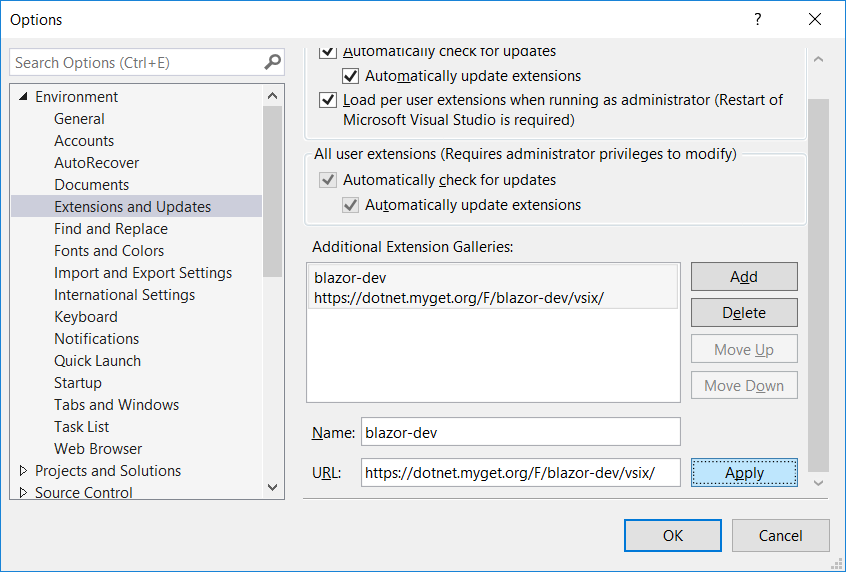
You should then be able to install or update the Blazor Language Service extension from the developer CI feed using the Extensions and Updates dialog.
Contributing
There are lots of ways that you can contribute to Blazor! Read our contributing guide to learn about our development process and how to propose bug fixes and improvements.