
Roo Code gives you a whole dev team of AI agents in your code editor.
 Saoud Rizwan
d324afdf14
Gracefully handle when user exits command early
Saoud Rizwan
d324afdf14
Gracefully handle when user exits command early
|
1 year ago | |
|---|---|---|
| .vscode | 08effc4799 Make react build task; add react-textarea-autosize; add settings button; add settings page; get basic chat interface working | 1 year ago |
| src | d324afdf14 Gracefully handle when user exits command early | 1 year ago |
| webview-ui | d324afdf14 Gracefully handle when user exits command early | 1 year ago |
| .eslintrc.json | 56bafe9f59 Fix warnings | 1 year ago |
| .gitattributes | 29204d784a Add demo.gif | 1 year ago |
| .gitignore | 9f169b7e4b Initial commit | 1 year ago |
| .nvmrc | fafdfe30a4 Add .nvmrc, .prettierignore, icon; Remove vsc quickstart guide | 1 year ago |
| .prettierignore | fafdfe30a4 Add .nvmrc, .prettierignore, icon; Remove vsc quickstart guide | 1 year ago |
| .prettierrc.json | 0ede211d4f Add vscode-webview-ui-toolkit and follow tutorial to get started | 1 year ago |
| .vscode-test.mjs | 9f169b7e4b Initial commit | 1 year ago |
| .vscodeignore | e356294754 Update .vscodeignore | 1 year ago |
| CHANGELOG.md | fc82d693ac Update CHANGELOG | 1 year ago |
| LICENSE | 691d4d6d59 Create LICENSE | 1 year ago |
| README.md | c1137277dc Update README and Announcement | 1 year ago |
| demo.gif | 998aa8b7eb Update demo.gif | 1 year ago |
| esbuild.js | 303da320aa Add analyze_project tool | 1 year ago |
| icon.png | fafdfe30a4 Add .nvmrc, .prettierignore, icon; Remove vsc quickstart guide | 1 year ago |
| package-lock.json | fc82d693ac Update CHANGELOG | 1 year ago |
| package.json | fc82d693ac Update CHANGELOG | 1 year ago |
| tsconfig.json | cd8bbc5c7f Update extension to use react app | 1 year ago |


README.md
Claude Dev
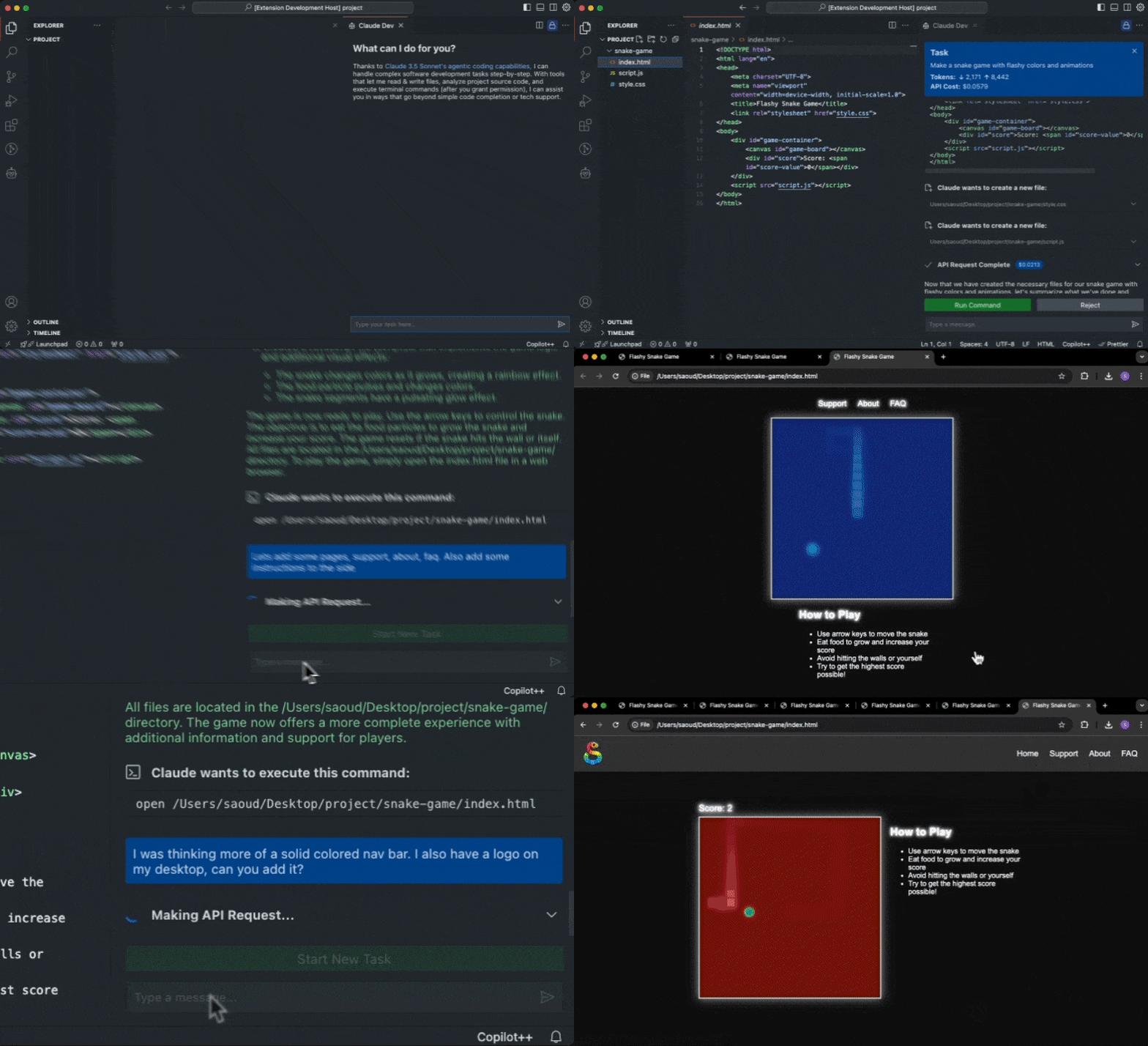
Thanks to Claude 3.5 Sonnet's agentic coding capabilities Claude Dev can handle complex software development tasks step-by-step. With tools that let him read & write files, analyze project source code, and execute terminal commands (after you grant permission), he can assist you in ways that go beyond simple code completion or tech support. From building software projects to running system operations, Claude Dev is only limited by your imagination.
While autonomous AI scripts traditionally run in sandboxed environments, Claude Dev offers a human-in-the-loop GUI to supervise every file change and command executed, providing a safe and accessible way to explore the potential of agentic AI.
- View syntax highlighted file previews and diffs for every change Claude makes
- Streams command execution output into the chat, so you never have to open a terminal yourself
- Presents permission buttons (i.e. 'Approve CLI command') before tool use or sending information to the API
- Keep track of total tokens and API usage cost for the entire task loop and individual requests
- Set a maximum # of API requests allowed for a task before being prompted for permission to proceed
- When a task is completed, Claude Dev determines if he can present the result to you with a CLI command like
open -a "Google Chrome" index.html, which you run with a click of a button
Pro tip: Use the Cmd + Shift + P shortcut to open the command palette and type Claude Dev: Open In New Tab to start a new task right in your editor.
How it works
Claude Dev uses an agentic loop style implementation with chain-of-thought prompting and access to powerful tools that give him the ability to accomplish nearly any task. Start by providing a task and the agentic loop fires off, where it might use certain tools (with your permission) to accomplish each step in its thought process.
Tools
Claude Dev has access to the following capabilities:
execute_command: Execute CLI commands on the system (only with your permission, output is streamed into the chat)analyze_project: Analyze the project's source code and file structure (see more below)list_files: List all file paths at the top level of the specified directory (useful for generic file operations like retrieving a file from your Desktop)read_file: Read the contents of a file at the specified pathwrite_to_file: Write content to a file at the specified path, automatically creating any necessary directoriesask_followup_question: Ask the user a question to gather additional information needed to complete a task (due to the autonomous nature of the program, this isn't a typical chatbot–Claude Dev must explicitly interrupt his task loop to ask for more information)attempt_completion: Present the result to the user after completing a task, potentially with a CLI command to kickoff a demonstration
Working in Existing Projects
The analyze_project tool uses tree-sitter to parse source code with custom tag queries that extract names of classes, functions, methods, and other definitions. This approach leverages the fact that large language models are fundamentally built on natural language processing–by focusing on these named elements, we provide the LLM with a structural understanding of the codebase that aligns closely with how developers conceptualize and organize their code.
This method is particularly effective because:
- Developers typically name components to reflect their purpose and role within the larger system.
- These names often encapsulate high-level concepts and relationships that are crucial for understanding the overall architecture.
- By effectively extracting the "language" of the codebase, we enable the LLM to grasp structure and intent without wasting context on implementation details.
Here's how analyze_project works:
- It scans your project directory, identifying source code files that tree-sitter can parse. Any unparsed files' paths will be listed at the end of the output so that Claude can request to manually read them if necessary.
- It parses each file into an abstract syntax tree and applies a language-specific query to extract definition names. You can see the exact query used for each language in
src/analyze-project/queries. - The results are formatted into a concise & readable output that Claude can easily interpret to quickly understand the structure and purpose of your entire codebase, making it more effective at assisting with complex development tasks.
Only With Your Permission
Claude always asks for your permission first before any tools are executed or information is sent back to the API. This puts you in control of this agentic loop, every step of the way.
Contribution
Feel free to contribute to this project by submitting issues and pull requests. Contributions are welcome and appreciated! To build Claude Dev locally, follow these steps:
Clone the repository:
git clone https://github.com/saoudrizwan/claude-dev.gitOpen the project in VSCode:
code claude-devInstall the necessary dependencies for the extension and webview-gui:
npm run install:allLaunch by pressing
F5to open a new VSCode window with the extension loaded
Reviews
- "Claude Sonnet 3.5 Artifacts in VSCode With This Extension" by CoderOne
- "Meet Claude Dev — An Open-Source AI Programmer In VS Code" by Jim Clyde Monge
- "AI Development with Claude Dev" by Shannon Lal
- "Code Smarter with Claude Dev: An AI Programmer for Your Projects" by Iana D.
- Claude Dev also hit top 10 posts of all time on r/ClaudeAI (thank you for all the lovely comments)
License
This project is licensed under the MIT License. See the LICENSE file for details.
Questions?
Contact me on X @sdrzn. Please create an issue if you come across a bug or would like a feature to be added.
Acknowledgments
Special thanks to Anthropic for providing the API that powers this extension.